完整实现#
U 形架构详解 中我们看了 U-Net 的四个核心组件。现在把它们组装成一个完整的 U-Net。
完整 U-Net 类#
class UNet(nn.Module):
    """完整 U-Net

    参数:
        n_channels: 输入通道数(灰度=1,RGB=3)
        n_classes:  分割类别数

    前向传播维度变化(输入 572×572 为例):
    编码器:  inc:    1×572×572  →  64×568×568
            down1:  64×568×568 → 128×280×280
            down2: 128×280×280 → 256×136×136
            down3: 256×136×136 → 512×64×64
            down4: 512×64×64   → 1024×28×28
    解码器:  up1: 1024×28×28 + skip → 512×52×52
            up2:  512×52×52 + skip → 256×100×100
            up3:  256×100×100 + skip → 128×196×196
            up4:  128×196×196 + skip → 64×388×388
    输出:    outc: 64×388×388 → 2×388×388
    """
    def __init__(self, n_channels, n_classes):
        super().__init__()
        self.n_channels = n_channels
        self.n_classes = n_classes

        # 编码器(1 → 64 → 128 → 256 → 512 → 1024)
        self.inc = DoubleConv(n_channels, 64)
        self.down1 = DownSample(64, 128)
        self.down2 = DownSample(128, 256)
        self.down3 = DownSample(256, 512)
        self.down4 = DownSample(512, 1024)

        # 解码器(1024 → 512 → 256 → 128 → 64)
        self.up1 = UpSample(1024, 512)
        self.up2 = UpSample(512, 256)
        self.up3 = UpSample(256, 128)
        self.up4 = UpSample(128, 64)

        # 输出层
        self.outc = OutConv(64, n_classes)

    def forward(self, x):
        # 编码器
        x1 = self.inc(x)
        x2 = self.down1(x1)
        x3 = self.down2(x2)
        x4 = self.down3(x3)
        x5 = self.down4(x4)
        # 解码器(拼接对应编码器特征)
        x = self.up1(x5, x4)
        x = self.up2(x, x3)
        x = self.up3(x, x2)
        x = self.up4(x, x1)
        logits = self.outc(x)
        return logits
这就是完整的 U-Net 前向传播——简单、对称、优雅。没有复杂的控制流,就是一条 U 形通道。
完整 U-Net 的参数量估算
以灰度输入(n_channels=1),二分类(n_classes=2)为例:
编码器:\(\approx 31\)M 参数
解码器:\(\approx 24\)M 参数
总计:约 55M 参数
作为对比,LeNet-5:练习峰首登 的 LeNet-5 约 60K 参数。U-Net 比它大了近 1000 倍——因为通道多(1024 vs 120)、有解码器、有跳跃连接的双卷积。
模型初始化#
def init_weights(model, init_type='kaiming'):
    """Kaiming 初始化 {cite}`he2015delving`(适合 ReLU 激活)"""
    for m in model.modules():
        if isinstance(m, nn.Conv2d):
            nn.init.kaiming_normal_(m.weight, mode='fan_out', nonlinearity='relu')
            if m.bias is not None:
                nn.init.constant_(m.bias, 0)
        elif isinstance(m, nn.BatchNorm2d):
            nn.init.constant_(m.weight, 1)
            nn.init.constant_(m.bias, 0)
训练配置#
def setup_training(model, device='cuda'):
    model = model.to(device)
    # 损失函数:交叉熵 + Dice 组合({ref}`unet-loss`详细讨论)
    criterion = CombinedLoss(weight_ce=0.5, weight_dice=0.5)
    # Adam 优化器
    optimizer = torch.optim.Adam(model.parameters(), lr=1e-4)
    # 验证损失不再下降时减半学习率
    scheduler = torch.optim.lr_scheduler.ReduceLROnPlateau(
        optimizer, mode='min', factor=0.5, patience=10
    )
    return model, criterion, optimizer, scheduler
评估指标#
Dice 系数不只是损失函数,也是最常用的评估指标。
def calculate_metrics(pred, target, threshold=0.5):
    """计算 Dice 和 IoU"""
    pred_bin = (pred > threshold).float()  # 概率转二值
    target_bin = (target > threshold).float()

    tp = (pred_bin * target_bin).sum().item()
    fp = (pred_bin * (1 - target_bin)).sum().item()
    fn = ((1 - pred_bin) * target_bin).sum().item()

    dice = (2 * tp) / (2 * tp + fp + fn + 1e-8)
    iou  = tp / (tp + fp + fn + 1e-8)
    return {'dice': dice, 'iou': iou}
推理示例#
def predict(model, image, device='cuda'):
    """对单张图像做分割预测"""
    model.eval()

    if len(image.shape) == 3:           # (C, H, W) → (1, C, H, W)
        image = image.unsqueeze(0)
    image = image.to(device)

    with torch.no_grad():
        output = model(image)
        if model.n_classes > 1:
            prediction = torch.argmax(output, dim=1)    # 取概率最大的类别
        else:
            prediction = (torch.sigmoid(output) > 0.5).float()

    return prediction.cpu().squeeze()
参数量统计#
# 统计模型参数量
model = UNet(n_channels=1, n_classes=2)
total = sum(p.numel() for p in model.parameters())
trainable = sum(p.numel() for p in model.parameters() if p.requires_grad)
print(f'总参数: {total:,}')
print(f'可训练: {trainable:,}')
# 输出: 总参数: 31,031,554
#       可训练: 31,031,554
端到端 Walkthrough:一张细胞图像走完 U-Net#
理论看了这么多,不如拿一张真实的细胞图像追踪完整流程。假设输入是 572×572 的灰度图(单通道)。
编码器阶段#
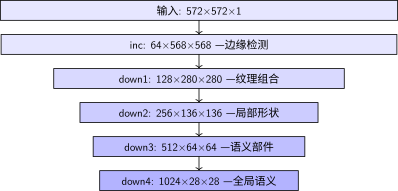
编码器各层输出维度与内容
每经过一个下采样块,空间减半、通道加倍、感受野扩大。一路走来,网络从"看到像素的边缘"变成"理解这是细胞核"。
解码器阶段#
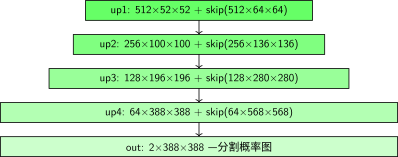
解码器各层:上采样+跳跃连接
数值示例:看一个像素如何被分类#
想象图像左上角有一个细胞核边缘的像素:
输入层:这个像素的灰度值是 142(0-255 范围)
inc 层:3×3 卷积核检测到它左右两侧的像素差异大 → 判断为"边缘",激活值变高
down1 层:池化后它被合并到 2×2 区域的最大值中,丢失了精确坐标,但保留了"这里有边缘"的信息
down2 → down4:随着下采样,它从"一个像素的边缘"变成了"一块区域的纹理"→"一个局部的形状"→"一个细胞核的组成部分"
最底部:1024 维的特征向量说"这是一个细胞核区域"
解码器上采样:一步步恢复分辨率,每次拼接编码器对应层的特征,补充精确位置
输出层:这个像素的 2 个输出值经过 softmax:[0.12, 0.88] → 预测为"细胞"(第 1 类)
整个过程,这个像素的身份从"142 灰度值"变成了"细胞核像素"。U-Net 的对称结构确保了 语义理解(编码器) 和 空间精度(跳跃连接) 在这个过程中都得到了保留。
这就是一个可用版 U-Net。但光有模型还不够——医学图像通常只有几十张标注数据。下一节 数据增强与训练技巧 我们看看如何用数据增强在有限数据上训练出好模型。
贡献者与修订历史
查看详细修订记录
-
dc35df22026-06-14 - Heyan Zhu: refactor: unify into two-chapter mountain-climbing narrative -
b5e265a2026-04-28 - Heyan Zhu: docs(unet): restructure documentation and update content -
0c291d72025-12-10 - Heyan Zhu: docs: restructure course materials and add new content